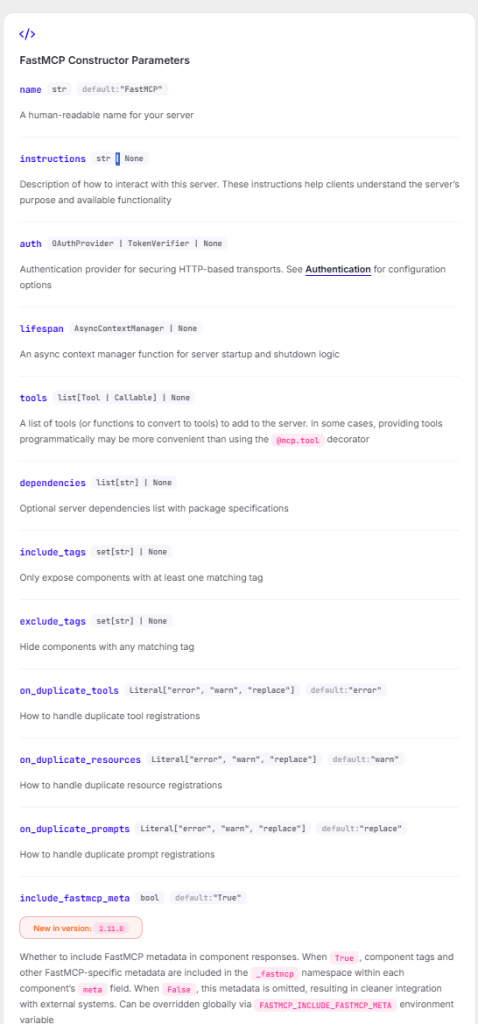
https://gofastmcp.com/servers/server
해당 문서를 참고 했다.
pip install fastmcp로 설치할 수 있다.
from fastmcp import FastMCP

#기본 서버 인스탄스를 생성한다.
mcp = FastMCP(name = "MyAssistantServer")
#어떻게 서버와 통신할 지에 대한 지침을 추가할 수 있다.
mcp_with_instructions = FastMCP(
name="HelpfulAssistant",
instructions="""
This server provides data analysis tools.
Call get_average() to analyze numerical data.
""",
)
from fastmcp import FastMCP


#Create a basic server instance
mcp = FastMCP(name = "MyAssitantServer")

# You can also add instructions for how to interact with the server

mcp_with_instructions = FastMCP(
    name = "HelpfulAssistant",
    instructions="""
        This server provides
    """
)

# tool은 클라이언트가 작업을 수행하거나 외부 시스템에 엑세스하기 위해 호출 할 수 있는 기능이다.
@mcp.tool
def multiply(a: float, b: float) -> float:
    """Multiplies two numbers together."""
    return a * b

# Resources는 클라이언트가 읽을 수 있는 데이터 소스를 노출하는 역할을 한다.
@mcp.resource("data://config")
def get_config() -> dict:
    """Provides the application configuration."""
    return {"theme": "dark", "version": "1.0"}

# 리소스 템플릿은 클라이언트가 특정 데이터를 요청할 수 있도록 하는 매개변수화된 리소스이다.
@mcp.resource("users://{user_id}/profile")
def get_user_profile(user_id: int) -> dict:
    """Retrieves a user's profile by ID."""
    # The {user_id} in the URI is extracted and passed to this function
    return {"id": user_id, "name": f"User {user_id}", "status": "active"}

# 프롬프트는 LLM에게 안내하기 위한 재사용 가능한 메시지 템플릿이다.
@mcp.prompt
def analyze_data(data_points: list[float]) -> str:
    """Creates a prompt asking for analysis of numerical data."""
    formatted_data = ", ".join(str(point) for point in data_points)
    return f"Please analyze these data points: {formatted_data}"


#FastMCP는 구성 가능한 include/exclude 태그 세트를 기반으로 구성 요소를 선택적으로 노출하는 태그 기반 필터링을 지원함. 이는 다양한 환경이나 사용자에 맞게
#서버의 다양한 뷰를 생성하는 데 유용함.
#매개변수를 사용하여 정의할 경우 구성 요소에 태그를 지정할 수 있다.


@mcp.tool(tags={"public", "utility"})
def public_tool() -> str:
    return "This tool is public"

@mcp.tool(tags={"internal", "admin"})
def admin_tool() -> str:
    return "This tool is for admins only"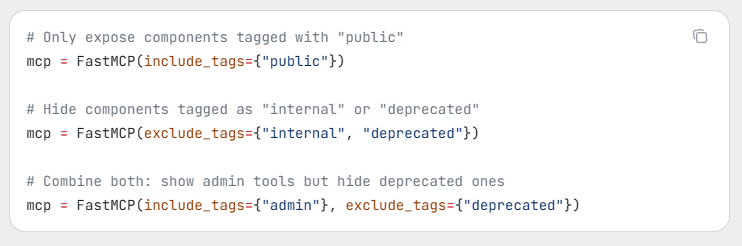
다음과 같이 태그 기반 필터링을 서버 생성시점에 구성하여 다른 레이아웃을 사용할 수 있는 모양이다.
from fastmcp import FastMCP


#Create a basic server instance
mcp = FastMCP(name = "MyAssitantServer")

# You can also add instructions for how to interact with the server

mcp_with_instructions = FastMCP(
    name = "HelpfulAssistant",
    instructions="""
        This server provides
    """
)

# tool은 클라이언트가 작업을 수행하거나 외부 시스템에 엑세스하기 위해 호출 할 수 있는 기능이다.
@mcp.tool
def multiply(a: float, b: float) -> float:
    """Multiplies two numbers together."""
    return a * b


# 프롬프트는 LLM에게 안내하기 위한 재사용 가능한 메시지 템플릿이다.
@mcp.prompt
def analyze_data(data_points: list[float]) -> str:
    """Creates a prompt asking for analysis of numerical data."""
    formatted_data = ", ".join(str(point) for point in data_points)
    return f"Please analyze these data points: {formatted_data}"


#FastMCP는 구성 가능한 include/exclude 태그 세트를 기반으로 구성 요소를 선택적으로 노출하는 태그 기반 필터링을 지원함. 이는 다양한 환경이나 사용자에 맞게
#서버의 다양한 뷰를 생성하는 데 유용함.
#매개변수를 사용하여 정의할 경우 구성 요소에 태그를 지정할 수 있다.


@mcp.tool
def greet(name: str) -> str:
    """Greet a user by name."""
    return f"Hello, {name}!"


if __name__ == "__main__":
    #mcp.run(transport="http", host = "127.0.0.1", port = 9000)
    mcp.run()
다음과 같이 서버를 실행할 수 있다.
python My_server.py
그럼 서버에 요청을 해볼 차례이다.
import asyncio
from fastmcp import Client

client = Client("My_server.py")

async def call_tool(name: str):
    async with client:
        result = await client.call_tool("greet", {"name": name})
        print(result)

asyncio.run(call_tool("Ford"))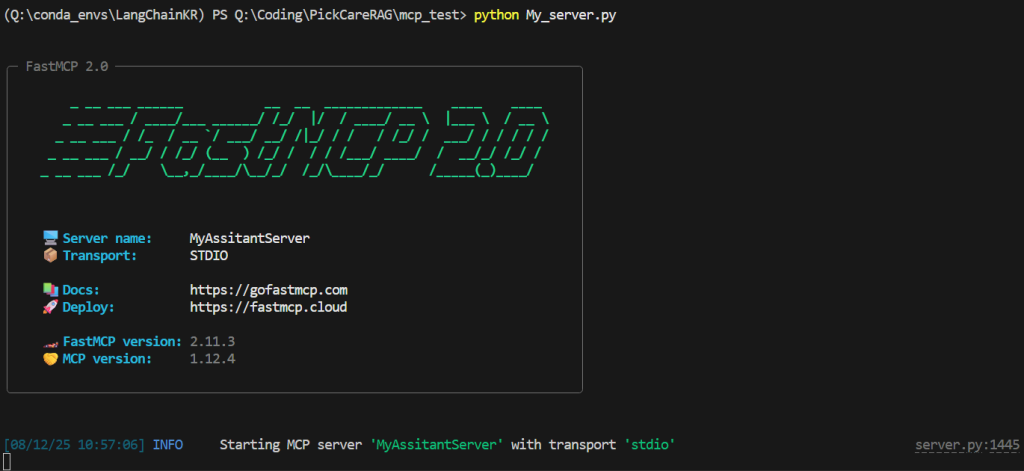
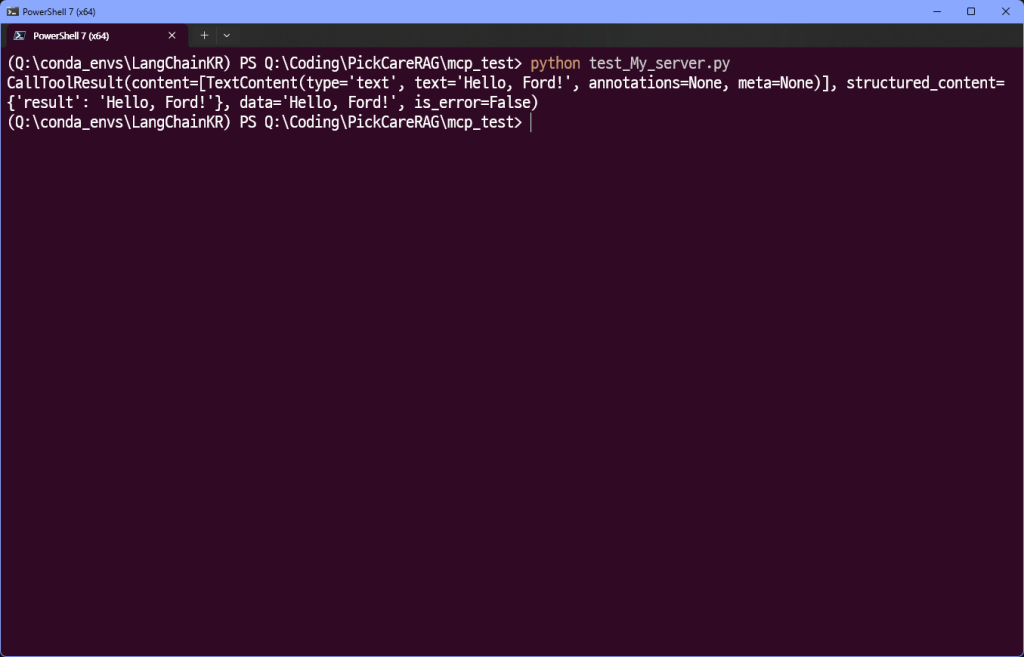
다음과 같이 응답 하는 것을 볼 수 있다.
#test3.py
from fastmcp import FastMCP

mcp = FastMCP()

if __name__ == "__main__":
    mcp.run(
        transport = "http",
        host = "127.0.0.1",
        port = 4200,
        path = "/my-custom-path",
        log_level = "debug"
    )
#client_test3.py
import asyncio
from fastmcp import Client
async def example():
async with Client("http://127.0.0.1:4200/my-custom-path") as client:
await client.ping()
if __name__ == "__main__":
asyncio.run(example())python test3.py
#다른 powershell 창 사용!
python client_test3.py

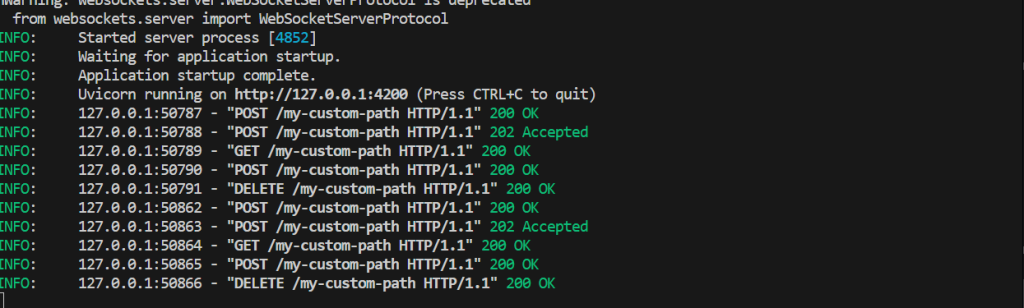
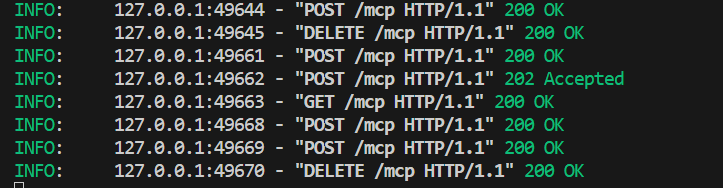
다음과 같이 ping에 대한 200 라는 status를 확인할 수 있었다.
from fastmcp import FastMCP
import asyncio

mcp = FastMCP(name = "MyServer")

@mcp.tool
def hello(name : str) -> str:
    return f"Hello, {name}!"


async def main():
    # Use run-async() in async contexts
    await mcp.run_async(transport = "http")


if __name__ == "__main__":
    asyncio.run(main())
import asyncio
from fastmcp import Client
async def example(name :str):
async with Client("http://127.0.0.1:8000/mcp") as client:
result = await client.call_tool("hello", {"name": name})
print(result)
if __name__ == "__main__":
asyncio.run(example(name ="booleanjars.com"))

CallToolResult(content=[TextContent(type=’text’, text=’Hello, booleanjars.com!’, annotations=None, meta=None)], structured_content={‘result’: ‘Hello, booleanjars.com!’}, data=’Hello, booleanjars.com!’, is_error=False)